Why Do Inbound Leads Look Good on Paper but Never Answer a Follow-Up in 2027?
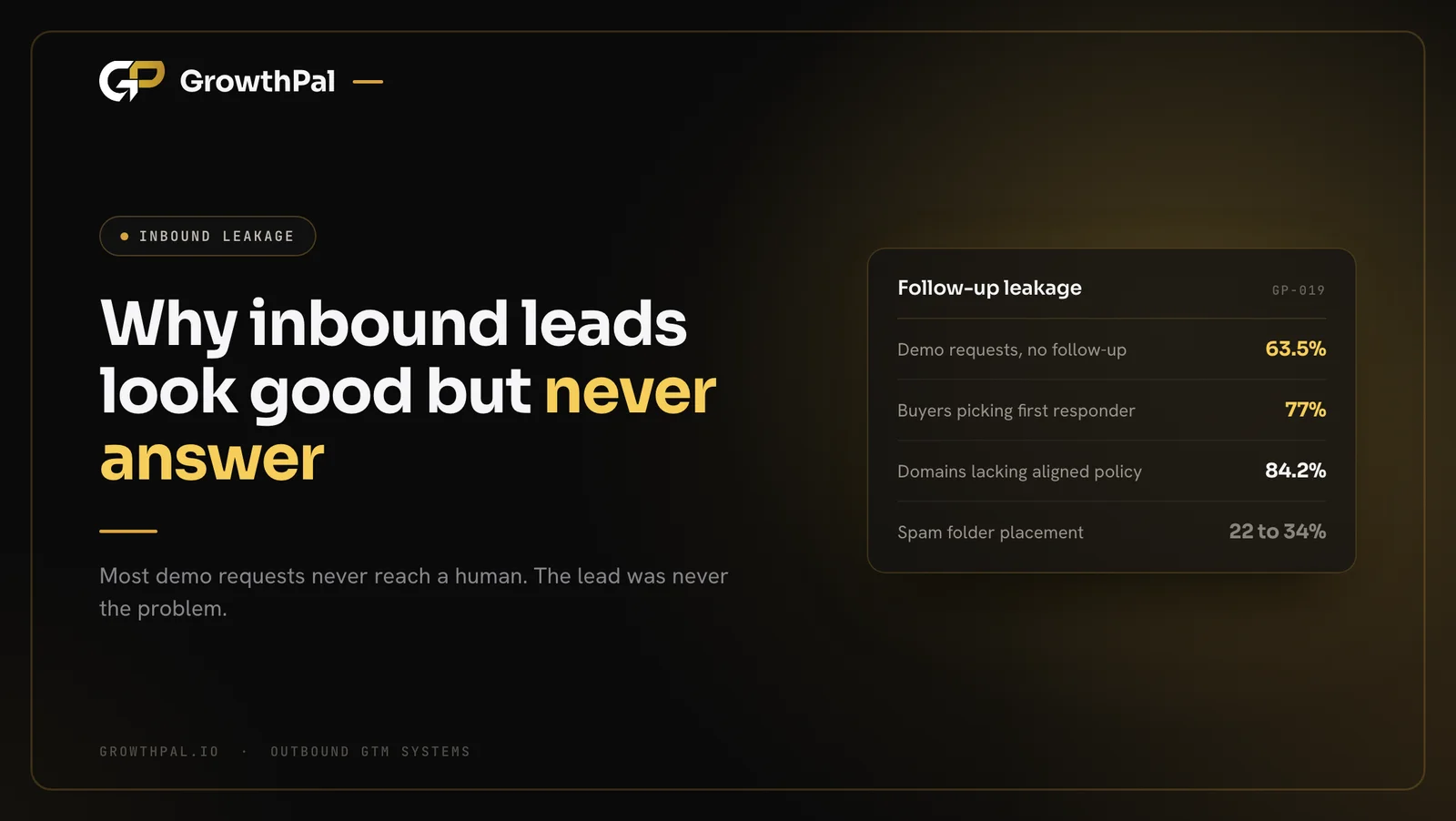
TL;DR Inbound leads that never answer usually point to the system, not the buyer: slow routing, follow-ups landing in spam, enrichment overwriting good form data, or assignment rules that stall. In a Harvard Business Review audit of 2,241 US companies, only 37 percent responded within an hour and 23 percent never responded at all.
You might think your representatives ignore demo requests entirely. The truth is your technology stack hides their replies, which explains why inbound leads ghost sales. This guide to unresponsive inbound lead diagnosis helps you fix the silent system errors breaking your pipeline.
Key takeaways
- Latency between marketing forms and your sales database creates fatal delays.
- Unauthenticated automated emails routinely land in corporate spam folders.
- Stale data enrichment tools swap accurate form inputs for old details.
- Strict spam rules penalise senders who lack full DMARC alignment.
- Round-robin assignment faults leave hot prospects sitting unassigned for hours.
- Artificial intelligence tools and disposable aliases block manual sales outreach.
How Do You Start Unresponsive Inbound Lead Diagnosis and Audit Latency?
You check latency by tracking the exact time a form submits against the moment a sales representative gets an alert during unresponsive inbound lead diagnosis. Hidden delays between marketing forms and sales databases cause prospects to book with rivals.
How do you map the data journey?
Every operations engagement at GrowthPal starts by auditing exactly where data comes from, where it goes, who owns it and whether it is right. You must check if your marketing tool uses scheduled API batches rather than instant webhooks to move information. Delayed syncs create dark windows that ruin your initial speed to lead, leaving prospects waiting for replies.
What causes platform integration conflicts?
Sync errors between tools like HubSpot and Salesforce trigger frustrating API retry backoffs on a daily basis. A high intent lead might ask for a demo at two o'clock, but system fights mean your team gets the alert at quarter to four. The prospect has already booked a discovery call with a faster rival by then.
How do you measure true notification time?
You must always measure the actual time it takes for an alert to reach an inbox. A 2022 Chili Piper study showed the average vendor response time to an inbound B2B demo request is four hours and fifty minutes. Your dashboard might show instant creation, but representatives wait hours before seeing the notification.
Why add instant scheduling to forms?
The best fix for latency is putting calendar access right on your website. Scheduling software loads the moment a form submits, letting qualified prospects pick a time right away without manual triage. You skip the routing delay and get the meeting while the buyer is eager to book a call.
Why Are Follow-Up Emails Landing in Corporate Spam Folders?
Automated follow-ups fail when they lack strict security rules. If your emails fail DMARC checks, safety filters silently block your calendar links before prospects see them.
How do you verify SPF and DKIM records?
Senders must use strict sender rules to reach the main inbox safely. A 2026 InboxEagle report estimated bad senders face a 22 to 34 percent spam folder placement rate across their campaigns. You should run a regular dkim checker to catch errors before they hide your sales replies.
Why fix DMARC on automated systems?
Many sales teams send automated replies through third party tools that lack proper domain alignment. A 2026 Growleads estimate suggested 84.2 percent of commercial sending domains lack fully aligned policies. Fix this right away with a dmarc generator to stop enterprise firewalls blocking your meeting links.
Are tracking links hurting your delivery?
Financial and healthcare buyers rely on strong firewalls like Proofpoint to protect their networks. Custom redirect tracking links often trip these sensitive filters, sending your prompt reply straight to quarantine. Strip out generic tracking pixels and send plain text emails to pass corporate security scans without issue.
How Does Stale Data Cause an Inbound Lead Conversion Breakdown?
Stale data ruins routing by swapping fresh form details for old job titles or wrong company sizes during unresponsive inbound lead diagnosis. This error sends rich enterprise prospects to junior representatives who lack the skill to win the deal.
What causes CRM enrichment routing failures?
CRM enrichment routing failures occur when automated waterfall tools overwrite a prospect's fresh form data with outdated third-party database records. This broken process pushes an enterprise buyer into a small business queue mistakenly. It causes fatal delays in appropriate follow-up and stops engagement completely.
How do you spot overwritten input?
A prospect might give their correct corporate email and current job title on your form. Your data tool like ZoomInfo then matches an old record from two years ago, updating the system with a junior title. This breaks your routing rules and delays the right sales response.
How should you audit your waterfall logic?
You need a clear order for your data sources to stop accidental overwrites. GrowthPal builds revenue systems that favour direct user input over scraped third party data to keep high accuracy. Set your rules to only fill empty fields so an old database cannot ruin a fresh lead.
Why bypass synthetic honeypot data?
Corporate technology teams often use strict anti scraping steps to protect staff data from outside collection. This means scraped databases often hold synthetic honeypots or fake job titles that corrupt your routing. Always build rules that flag odd data for human review before giving a lead to a representative.
What Causes Round-Robin Lead Assignment Breakdowns?
Assignment breakdowns happen when complex software rules fight or when representatives ignore automated queues. These faults leave hot prospects sitting alone while their buying intent drops fast in the first hour.
How do you check for conflicting rules?
Overlapping CRM assignment rules create logic loops that stall lead sharing entirely. You must map your crm routing rules for inbound carefully during any setup to dodge these hidden fights.
Are representatives cherry picking from the queue?
Sales representatives often watch incoming queues and pick the easiest deals while ignoring hard accounts. This leaves poorly enriched leads sitting untouched while their interest fades away. Use strict rules within your CRM to expose representatives bypassing the automated first-in, first-out logic.
Why set strict inactivity limits?
A Harvard Business Review study of 1.25 million leads found that firms contacting a lead within an hour were nearly seven times as likely to qualify it as those that waited one more hour, and more than 60 times as likely as those that waited a day. You cannot afford to let leads sit with absent representatives while rivals call them. Build a rule that reassigns any untouched lead after thirty minutes.
How Do You Manage Out-Of-Hours Form Submissions Effectively?
Late submissions often fall into a void because teams lack constant coverage for their forms. You must set up tools to qualify these prospects right away before they lose interest. Picking between an artificial intelligence agent or a global team means balancing cost and speed.
Which out-of-hours coverage method works best?
| Method | Speed of Response | Human Effort |
|---|---|---|
| AI Agent | Instant | Zero |
| Global Team | Under 5 mins | Very High |
| Auto Responder | Instant | Low |
| Next Day Call | 12 to 24 hours | Medium |
| Choose an artificial intelligence agent if you need fast scale without high staff costs. Choose delayed manual calls only if your buyer expects a highly custom service. |
When should you use intelligent agents?
Electronic commerce technology firms often get leads during seasonal peaks across all global time zones. Automated agents can check prospects and book demo slots twenty-four hours a day without human delay. These systems ensure buyers wake up to a confirmed calendar invite rather than an empty inbox.
Why avoid generic auto responders?
Sending a generic auto responder telling the prospect you are asleep rarely helps their buying journey. It just reminds them they have to wait for a human to start working again. Give value right away by sending ungated guides, and use a spam word checker to ensure delivery.
How do you manage global handovers?
If you employ global sales teams, your routing rules must match local working hours. A lead sending a form from London at midnight should never route to a sleeping European representative. Route it right away to an active colleague in a different timezone to secure the chat.
Fix Your Follow-Up Infrastructure
Stop losing pipeline to slow responses and poor deliverability. GrowthPal's revenue operations work starts with an audit of where your lead data comes from, where it goes, who owns it and whether it is right, then fixes routing, enrichment and follow-up. We build it and hand it over, or run it month to month.
Why Do Artificial Filters and Gateways Block Sales Calls?
Performing an unresponsive inbound lead diagnosis reveals that corporate filters block calls and emails to guard staff from pushy marketing tactics. Prospects often use throwaway email aliases and smart phone menus to screen vendors before granting direct sales access.
How do you spot disposable corporate aliases?
Buyers often use temporary email aliases to get whitepapers or ask for early facts from vendors. These addresses forward to their main inbox but let them cut off contact fast if representatives push too hard. Once the prospect deletes the alias, your team chases a dead end.
How do you navigate automated phone switchboards?
You might get a perfect ideal customer profile lead, only to find their phone number routes to a smart switchboard. Direct dials are heavily guarded by modern enterprise buyers who want to avoid sales pressure. Your system should flag generic corporate numbers and shift these prospects to email.
What is server side link pre fetching?
Security software often opens emails and clicks links on its own to check for malware. This automated action creates fake engagement metrics in your software, fooling representatives into thinking the prospect cares. Your team might call a prospect because they supposedly clicked a link, only to find they never saw the email.
How Do Deliverability Penalties Impact Sales Follow-Ups?
Strict sender rules route your vital follow-up messages right into the junk folder. Crossing the maximum spam complaint limit ruins your domain standing and stops prospects from seeing your calendar links.
Why monitor strict spam thresholds?
Google and Yahoo rules from 2024 state a strict 0.30 percent spam complaint limit for all senders. Use a sending domain generator to plan separate sending domains, and watch your spam rate in Google Postmaster Tools. If your emails push you over this line, your manual sales replies will land directly in the spam folder.
Should you separate marketing and sales domains?
You should never send bulk marketing blasts from your main email domain. GrowthPal over-provisions inboxes by fifty to one hundred percent as redundancy to protect core communications. Leave open and click tracking off: tracked resources are what filters look for, and prefetching makes the numbers unreliable anyway.
Why avoid sudden outbound cadence spikes?
Microsoft Outlook uses strict protections against sudden volume jumps from new domains delivering to their network. If your system releases hundreds of delayed follow-ups at once, that spike can trigger throttling. A steady approach is key, so you must smooth out your sending volumes.
How do you manage unsubscribe compliance?
The Internet Engineering Task Force standard demands automated one click unsubscribe links for all bulk mail. If your automated inbound follow-ups lack these headers, inbox providers will punish your sending reputation heavily. Ensure your marketing tools insert these functional headers to reach the primary inbox safely.
How Should You Start Unresponsive Inbound Lead Diagnosis Fixes?
You must rebuild your inbound follow-up process from scratch to ensure it works properly. Using a strict checklist stops leads from falling through the cracks. This careful plan drives speed to lead operational fixes and helps in improving inbound lead response rates permanently.
How do you conduct a full infrastructure audit?
You cannot fix what you do not grasp, so start by mapping exactly how data flows from your website into your CRM. Check every webhook for latency or hidden failure rates. A thorough unresponsive inbound lead diagnosis will expose the hidden delays destroying your pipeline.
Why restrict aggressive automated sequences?
Someone who asked for a demo expects a reply about that demo, not a long marketing sequence. Moving an inquiry into broader marketing can need consent, depending on the country and whether the person is an individual or a corporate subscriber. This is general guidance, not legal advice. Keep your initial follow-ups highly relevant, and use a cold email grader to refine your messaging.
How do you train your team on speed?
A 2025 benchmark from 6sense showed 77 percent of enterprise buyers pick the vendor that responds first. Your representatives must know that speed is their greatest edge in a tough market. Fixing inbound lead follow up dropoff means building dashboards that publicly track median response times to create healthy urgency.
Follow this technical remediation checklist.
- Measure the exact latency between form submission and CRM creation.
- Remove generic tracking pixels from initial automated email responses.
- Verify your SPF and DKIM records for all sending domains.
- Implement strict DMARC alignment for your transactional email systems.
- Audit your data enrichment waterfall for outdated information.
- Embed instant calendar booking tools directly on your forms.
- Set a thirty minute reassignment rule for unhandled inbound leads.
- Separate your bulk marketing domains from your core sales domains.
- Monitor Google Postmaster Tools for spam complaints exceeding thresholds.
- Test your routing logic using synthetic lead data inputs.
Identify Your Revenue Potential
Get a clear view of your revenue potential with our free service. We deliver a mapped market, buyer breakdown, five message angles, and five signal plays within an hour. Fix your strategy quickly by claiming your detailed market overview.